Ability to Block Suite Rooms for Groups
Stay allows users to block suite room numbers for suite room types selected for groups.
This feature is applicable when selecting suite room types from the Setup section of the Room Blocks tab of groups only. Suite room numbers cannot be blocked by importing the rooming list for groups in the Staging section of the Reservations tab of groups.
Contact Agilysys to enable this feature for the property.
-
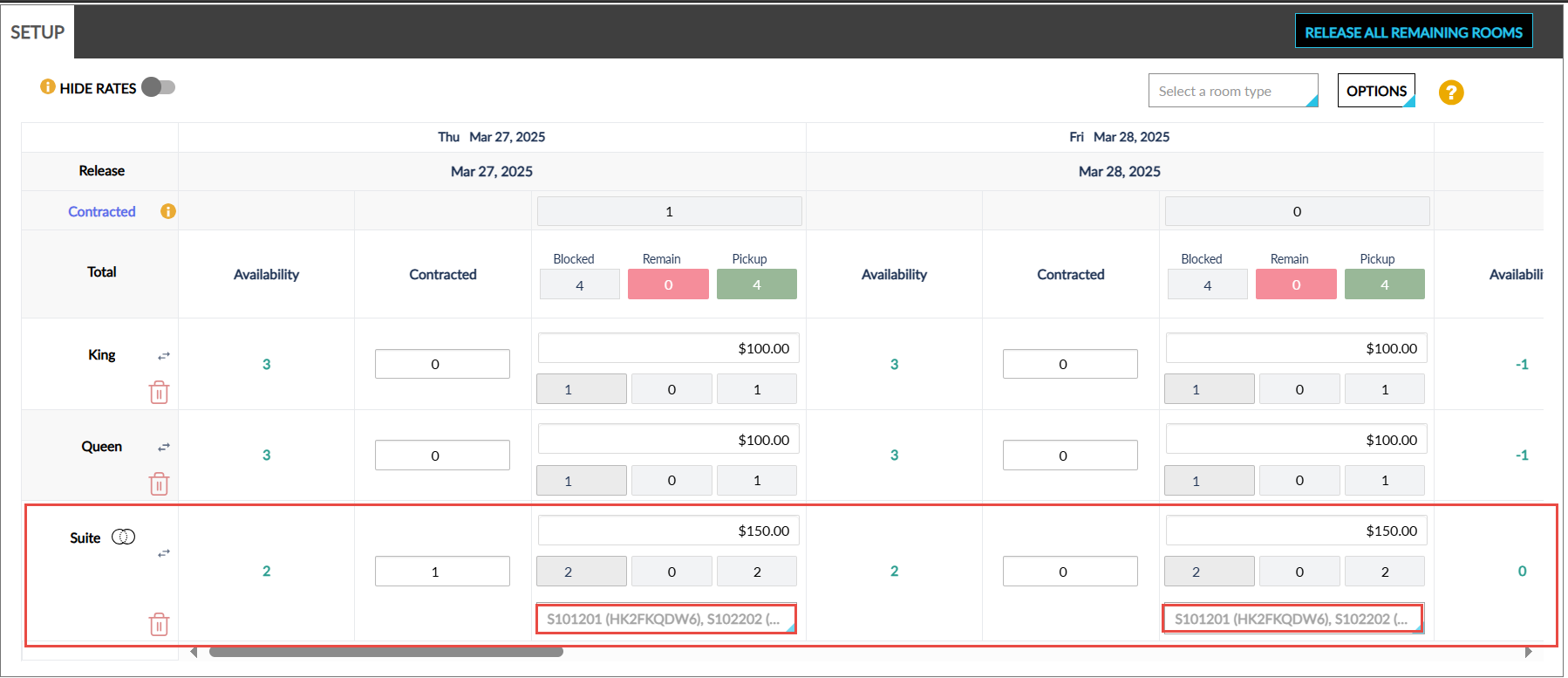
When a suite room type is selected from the Room Type drop-down list, a multi-select drop-down list is displayed for the suite room type that displays the suite room numbers available for the room type. Users can block the preferred suite room numbers for the group.
-
When a suite room number is blocked for a different group, the room number displayed in the drop-down list will be greyed out and cannot be selected.
-
When a suite room number is assigned to a reservation that is part of the current group, the suite room number is displayed as greyed out and selected. Users cannot select or deselect the room number. To block/unblock the suite room number as part of the group, users must first unassign the room number from the reservation to which it is assigned.
-
When a suite room number is assigned to a reservation that is not part of the current group (different group, or individual reservation), the suite room number is displayed as greyed out. Users cannot select or deselect the room number. To block/unblock the suite room number as part of the group, users must first unassign the room number from the reservation to which it is assigned.
-
When one of the component rooms of a suite room is assigned to a reservation for the selected date, the suite room number is displayed as greyed out.
-
When one of the component rooms of a suite room has an inventory block for the selected date, the suite room number is displayed as greyed out.
-
When users select a suite room number, the Blocked count increases by 1 and vice versa. The Blocked count cannot be modified directly.
For existing groups with suite room types selected, users must manually select the preferred suite room numbers for the group.
Copy Functionality for Suite Rooms
Users can continue to use the Copy to all dates functionality (Groups ➜ Room Blocks ➜ Setup ➜ Options ➜ Copy to all dates) for suite room types. The Copy to all room types and Copy to all dates & room types options are not applicable for suite room types and cannot be selected.
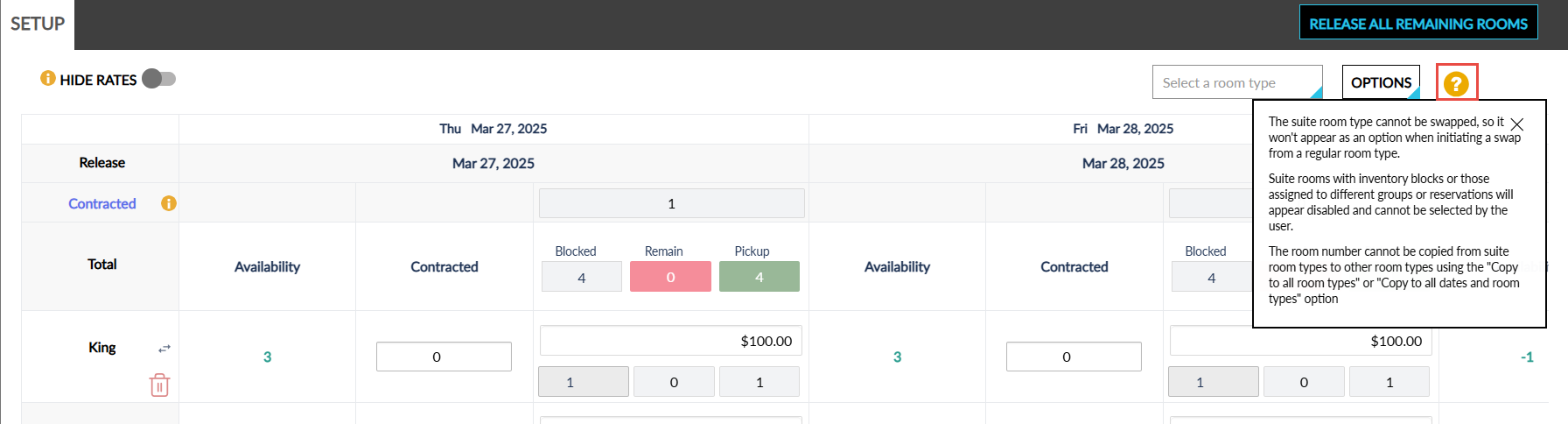
When a suite room type is selected for a group, a legend icon is displayed next to the Options menu. When clicked, the following information is displayed:
-
The suite room type cannot be swapped, so it won't appear as an option when initiating a swap from a regular room type.
-
Suite rooms with inventory blocks or those assigned to different groups or reservations will appear disabled and cannot be selected by the user.
-
The room number cannot be copied from suite room types to other room types using the "Copy to all room types" or "Copy to all dates and room types" option.
When users select the Copy to all dates option after selecting one or more suite room numbers, the availability of the suite room is checked for all dates.
-
When the suite room is available, the room number is copied to the remaining dates.
-
When the suite room is not available, a Confirmation pop-up screen appears.
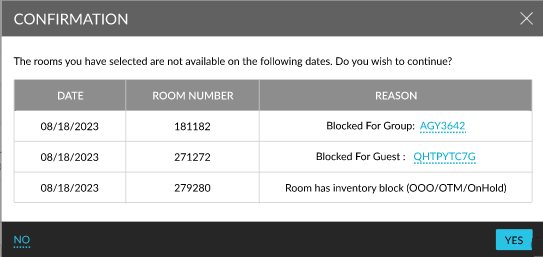
This screen displays the following details of the suite rooms that are not available for the selected dates:
|
Field |
Description |
|---|---|
|
Date |
The date when the suite room is not available. |
|
Room Number |
The suite room number that is unavailable. When one of the component rooms is not available, the suite room number is displayed. |
|
Reason |
Displays one of the following reasons for the unavailability of a suite room:
|
When users click Yes, only the available suite rooms are copied to the remaining dates and the unavailable rooms are skipped. When users click No, the pop-up screen is closed.
Book Reservations using Suite Rooms
When users select the suite room type blocked for a group in the Book a Reservation screen and proceed to book the reservation, the suite room numbers, blocked for the selected suite room type for the group, is displayed in the Other Matching Rooms section of the Room Assignment tab of the Book a Reservation screen. Users can select the preferred suite room number and book the reservation. Once the reservation is booked, the following changes occur:
-
The suite room number selected is displayed as selected for the group and greyed out.
-
The Pickup and Remain count are updated for the room type accordingly
When users select a suite room type that is not blocked for a group in the Book a Reservation screen and proceed to book the reservation, all the suite room numbers available for the room type are displayed in the Other Matching Rooms section of the Room Assignment tab of the Book a Reservation screen. Users can select the preferred suite room number and book the reservation. Once the reservation is booked, the following changes occur:
-
The selected room type is blocked for the group in the Room Blocks tab.
-
The suite room number selected is displayed as selected for the group and greyed out.
-
The Pickup and Remain count are updated for the room type accordingly.
Assigning Suite Rooms through Import
When creating group reservations by importing a rooming list for the group, the suite room numbers that are blocked for the group are assigned in priority based on their rack order followed by the suite rooms that are not blocked for the group.
Consider the following suite room numbers and their rack order.
|
Suite Room Number |
Rack Order |
|---|---|
|
100s [99 and 100] |
1 |
|
101s [101 and 102] |
2 |
|
103s [103 and 104] |
3 |
|
105s [105 and 106] |
4 |
Consider a group, Wedding, that has suite room numbers 103s and 105s blocked.
Scenario1
When a reservation is created for the group using a rooming list with the room number specified as 103s, the reservation is created with the room assigned since the room is blocked for the group.
Scenario 2
When a reservation is created for the group using a rooming list with the room number specified as 101s, the reservation is created with the room assigned as 105s instead of 101s, since the blocked room (105s) is available for the group.
Scenario 3
When a reservation is created for the group using a rooming list with the room number specified as 101s, the reservation is created with the room assigned as 100s instead of 101s, since the rack order of 100s precedes 101s.
Similarly, when users create group reservations using staged data created manually (Group ➜ Reservations ➜ Staging ➜ Add) without importing a rooming list, the suite room numbers are assigned as mentioned.